
Altair HyperMesh
Why HyperMesh?
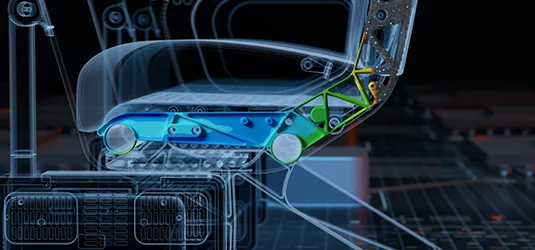
Model-build and Assembly Meets Digital Thread and Concept Modeling
HyperMesh transforms model-building and assembly into a traceable, connected process. Beyond preparing simulation-ready models, it captures and manages the metadata that link parts, subsystems, and design changes across teams. Through the digital thread, every update is tracked and tied back to HyperMesh libraries and PLM / PDM systems — whether it’s new geometry, configurations, or concept models. This ensures engineering data stays connected, enabling faster decisions, fewer errors, and reduced physical testing, cutting costs, and accelerating time to market.

Broad CAD, FEA, Meshing, and Solver Support in One Environment
Engineers lose time jumping between tools to clean geometry, build meshes, set up solvers, display representations, and analyze results. HyperMesh FEA analysis software unifies the entire simulation workflow by having pre- and post-processing included within one solver-connected environment. Teams can edit geometry, assemble models, define solver-specific inputs, and visualize or review results without ever leaving the platform. With broad interoperability across in-house and third-party CAD and solver systems, HyperMesh eliminates bottlenecks, reduces rework, and helps teams deliver faster, more consistent results.
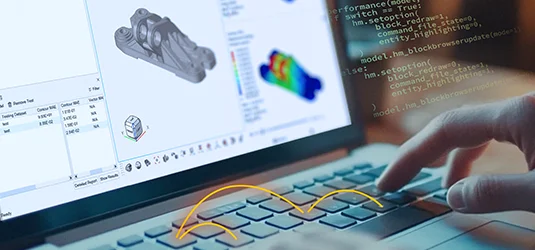
Open, Automated, and Programmable Workflows
HyperMesh gives engineering teams the flexibility to build simulation workflows as they wish — without replacing the tools they already use. The FEA analysis software’s open architecture and Python APIs make it easy to integrate with existing systems, connect to in-house tools, and fit into established processes. With built-in automation tools that convert clicks into code, engineers can turn tasks such as geometry cleanup, model setup, report generation, pre- and post-processing into reusable scripts. This enables teams to eliminate repetitive work, enforce standards, and empower more users to run simulations without error. HyperMesh helps organizations scale simulation on their terms.
Key Features
Streamlined Geometry Import and Model Assembly
Import, classify, and assemble bulk geometry via automated or semi-automated workflows to display representations or build large-model assemblies at scale. Create common models, multiple assembly configurations, and load cases without manual inputs.
Meshing Software at Scale
Simplify the creation of large model meshes that adhere to industry requirements. What once took engineers hundreds of inputs now takes a few clicks.
Automated Workflows
Streamline large assembly and finite element modeling setup by automating the import, classification, and joining of CAD models. Then use automated meshing tools to cleanup, refine, and create shell, solid, and other mesh types.
Concept Modeling, Optimization, and Design Exploration
Use generative design, parameterization, and simulation-led design techniques to rapidly explore concepts early in development. Additionally, explore a product’s design space, assess feasibility, evaluate trade-offs, and identify geometries that are lightweight and durable.
Topology Optimization to 3D CAD
After finding an optimal design, via topology optimizations and other design space exploration and optimization tools, convert the resulting geometry into formats ready for downstream use.
Automated Report Generation
With the push of a button, create customized reports within HTML, PDF, Docx, and PPTx formats. Reports can include equations, images, 3D objects, and other simulation, optimization, and CAE post-processing results.
Python and API Integration
Customize HyperMesh to work optimally for your organization or capture a simulation expert’s knowledge by recording their workflows into Python code. Engineers can then use the code to build templates, automations, and democratized simulation applications.
Straightforward Solver Setup
Guided workflows help engineers set up load cases and define models for various finite element modeling analyses, including fatigue, durability, crash and safety, noise, vibration, and harshness (NVH), multiphysics simulations, and more.
Reduced Order Modeling and Skeleton Modeling
Simplify complex and large simulations by producing 1D reduced order models (ROMs) that mimic the output of 3D simulations. Use these simplified models to quickly optimize whole assemblies.
AI Modeling, Simulation, and Design

Further Automate Model Production with AI and Metadata
Engineers can automate much of their manual simulation inputs and workflows using AI tools. Use CAD metadata to automate simulation inputs, like material creation and assignment — eliminating tedious manual work and accelerating model preparation.

Automated Pattern and Shape Recognition
AI shape recognition enables engineers to simultaneously discover, list, group, classify, select, and edit similar shapes within the geometry. With AI, HyperMesh can find patterns in a model, making it easier to automate model cleanup, feature extraction, meshing, and more.

Accurate Physics Results in Real-Time
Engineers can leverage Altair® PhysicsAI™ technology to train models on historical simulation data. These AI tools are embedded into HyperMesh and can create physics predictions 1000x faster than traditional numerical simulation solvers. PhysicsAI supports transformer-neural simulators (TNS) and graph convolution networks (GCN) neural network architectures.